






How to Engrave Metal With a Fiber Laser
Try to engrave bare stainless on the desktop CO2 laser that most small shops own and you get a faint smudge at best. At 10.6μm the beam reflects off bare metal rather than being absorbed, so more power and more passes don't rescue it. That isn't a settings problem.
What that limit belongs to is the machine class, not the wavelength by itself. Industrial CO2 systems with high power, assist gas and the right optics do cut and mark mild steel. They're a different category of equipment from a 50–100W glass-tube flatbed sitting in a workshop. Everything below is about the desktop class.
Fiber lasers run at 1064nm, which metal absorbs properly. That's the machine class for metal marking. Here's what it does, how deep it goes, and which of the fiber laser engravers for metal fits your volume.
Safety First
These are Class 4 laser products. That means wavelength-specific eyewear during operation, a controlled workspace with the enclosure or interlock in place, and fume extraction for coated or plated metals. Class 4 is not a label you work around.
What the Beam Does to Metal
Three marks come out of the same machine, and the difference is heat input.
Annealing
The surface heats without melting and forms a dark oxide layer. This is how medical instruments get serial numbers. It's a chemical change rather than a depth change, so the mark doesn't sit on the surface waiting to wear off the way ink would.
How well it survives is a separate question, and it depends on the alloy, the heat you put in, and where the part lives. Trotec's technical note on annealing steel with a laser points out that unsuitable heat input can increase the corrosion susceptibility of the marked area. A mark that looks perfect on day one can show rust six months later on a part that sees moisture, salt or cleaning chemicals. On stainless that will be handled, washed or used outdoors, test the exact alloy and come back to it after a few weeks before you commit to a production run.
Etching
A thin surface layer vaporizes. High contrast, shallow, fast. Your default for logos and names on tools.
Deep Engraving
Material is removed over multiple passes. On OMTech's product pages the rated max marking depth is 0.04mm for the 20W fiber, 0.1mm for the 50W fiber and the 60W MOPA, and 0.13mm for the 80W MOPA. Treat those as ceiling figures measured under specific lens and material conditions, not promises that hold on every job.
More important than the number is how you get there. Metal engraving accumulates depth through many fast hatch passes, not one slow heavy pass. If you're running single-pass at 100% power and wondering why the surface looks burnt instead of deep, that's the misunderstanding. And if 0.5mm-plus depth is a real job requirement, that's a different machine class than a marking laser.
What Each Metal Gives You
| Metal | What you get | Notes |
|---|---|---|
| Stainless steel | Black annealed mark or white etch | Color marking on stainless requires a MOPA source; standard fiber is largely grayscale. |
| Carbon steel | Dark, high-contrast etch | Fast and forgiving. |
| Anodized aluminum | White metal revealed under the coating | Cleanest-looking result on the list. |
| Bare aluminum | Light gray mark | Works, but lower contrast. |
| Brass | Golden, deep-contrast mark | Popular for badges and plaques. |
| Copper | Dark, crisp mark | Lower absorption than steel or aluminum; MOPA gives more consistent results than standard fiber. |
| Coated metals | Coating burned away, base metal exposed | Powder-coated tumblers, painted panels. |
Silver and gold absorb 1064nm less efficiently than the metals above, so precious-metal jewelry work needs different expectations than steel or brass.
Standard Fiber, MOPA, or Galvo
These three words get used interchangeably and cause bad purchases. They aren't the same axis.
Standard Fiber (Q-switched)
Fixed pulse characteristics, marks the common metals well, cheapest way in. A 50W unit with a 7.9" × 7.9" area is a typical starting point. See the 50W galvo fiber laser. Frequency range is narrow by MOPA standards (50–100kHz), pulse width sits around 120–150ns. Color marking on this class is very limited, mostly grayscale.
MOPA
Pulse width and frequency are independently adjustable, and that's the whole point. On a MOPA source you can go from 2ns pulses for fine, low-heat detail to 200ns and beyond for deep black annealing, with frequency anywhere from 1kHz to 4000kHz. That combination is what produces color marking on stainless steel and clean marks on anodized aluminum.
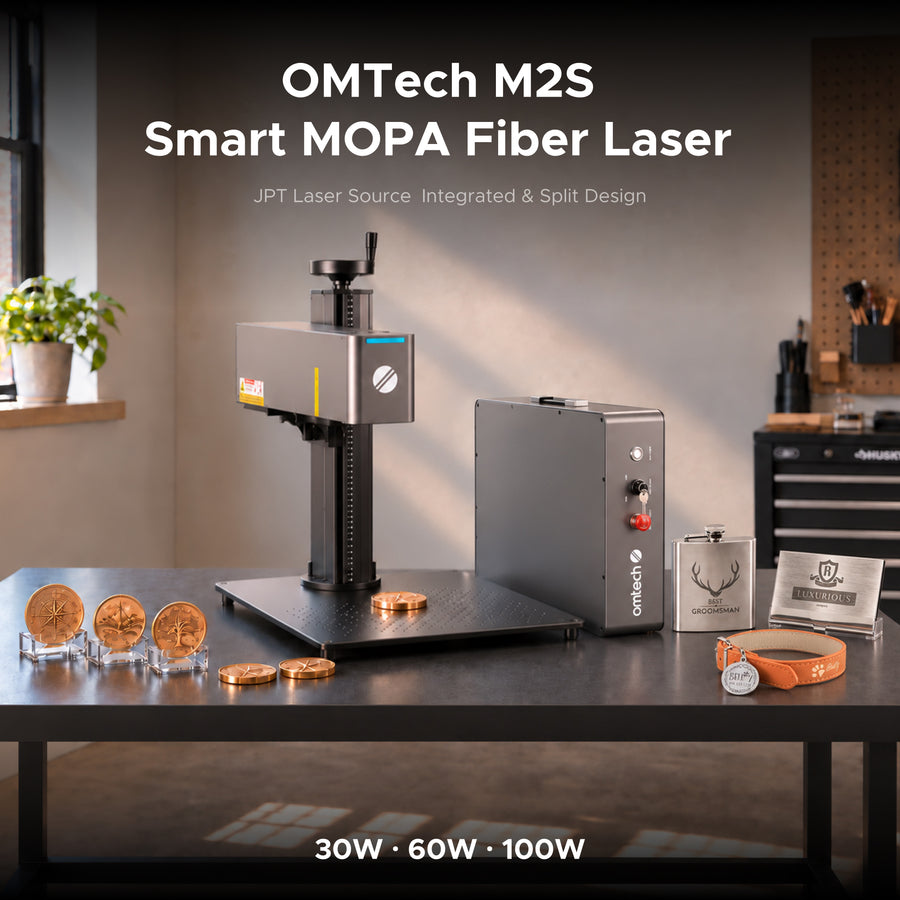
If laser color marking — color straight off the beam, with nothing added afterwards — is a product you want to sell, MOPA is the requirement, not the upgrade. Browse MOPA fiber laser markers; the 60W MOPA split fiber laser is the volume workhorse, with 100W available when you need more headroom per pass.
Galvo is not a laser type. It's the beam-steering mechanism. Mirrors move the beam instead of a gantry moving a head, which is why these machines are rated to 10,000 mm/s. Nearly every compact fiber and MOPA machine is galvo-based. See galvo fiber laser markers to compare split versus integrated bodies.

What Wattage Actually Buys You
20W
0.04mm depth
Light marking, coated metals, anodized aluminum
50W
0.1mm depth
General metal marking, production speed
60W MOPA
0.1mm depth
Color marking plus depth, higher throughput
80W MOPA
0.13mm depth
Deeper marks within lens limits, high-volume work
Extra watts mainly buy speed and headroom, not unlimited depth. A 30W and a 60W land in the same depth class. And percentage power is machine-relative: 30% on a 60W is twice the absolute energy of 30% on a 30W, so settings don't transfer between models. Anyone quoting "30% power, 400 mm/s" without naming the machine is handing you half a recipe.
Software Settings That Decide the Result
Hardware gets you the beam. Software decides whether the mark looks professional. OMTech's MOPA machines ship with EzCad2, and the same hardware runs LightBurn's galvo version; both expose the same handful of controls.
Fill, Line Interval and Loop Count
- Hatch (fill) turns an outline into a solid mark. Engraving metal means filling, not outlining.
- Line interval is the spacing between hatch lines. Fine detail and smooth surfaces want 0.01–0.05mm. Too wide and you see stripes; too tight adds heat and time without adding darkness.
- Loop count is how many times the fill repeats. Depth comes from loops, not from maxing power. Two or three loops at moderate power beat one blast at 100%, and they don't cook the surrounding metal.
Hatch Angle
Rotate the hatch angle between passes — classically 45°, 90°, 135°. Stacking passes at the same angle leaves a brushed, directional texture that catches light badly. Crossing the angles evens out the surface. This one setting separates deep engraving from a surface that looks like someone dragged a comb across it.
Focus
Fiber focus is set with the dual red dots — two beams converge into a single point at the correct focal distance — or with the supplied focus ruler. You can't eyeball this the way you might on a CO2 bed: the focal spot is tiny, and a millimetre off visibly reduces contrast. Re-check it whenever the machine moves or the workpiece height changes.
Settings to Test First
These are starting points for OMTech fiber and MOPA machines only. Do not copy them to another brand without re-testing.
| Parameter | Starting point | What it changes |
|---|---|---|
| Power | 20–40% | Darkness and heat input; on MOPA, color depends on keeping this low and stable. |
| Speed | 300–1500 mm/s | Higher speed gives a lighter mark; fiber tolerates far higher speeds than CO2. |
| Frequency | 1–4000 kHz (MOPA); 1500–3000 kHz for black anneal and color | Higher frequency is smoother and lighter; lower is deeper and rougher. |
| Pulse width | 2–500 ns, typical presets 2 / 6 / 20 / 60 / 200 ns | Short pulses for fine detail and color; long pulses for deep black. |
| Line interval | 0.01–0.05 mm | Stripe visibility versus heat build-up. |
| Loop count | 1–3 | Depth; add loops instead of power. |
| Hatch angle | Rotate 45° per pass | Eliminates directional brushing. |
For a cross-material reference, our material settings reference covers wood, acrylic, leather and metal side by side.

Five Mistakes That Ruin Metal Jobs
Where the Money Is
The applications that pay for a fiber machine fastest are powder-coated drinkware, serialized outdoor and firearm parts, industrial nameplates and UID plates on recurring contracts, challenge coins with paint fill, and brass or steel branding. Most are repeat orders rather than one-offs, which is what makes the machine economics work.
Two different techniques get called "color" in this trade, and mixing them up is how people end up buying a machine they don't need.
Paint Fill
Engraving a recess, rubbing enamel or paint into it, then wiping the surface clean so only the recessed area stays filled. The laser's job is to cut the pocket; the color comes out of a jar. A standard fiber does this perfectly well. Challenge coins, filled badges and most signage-style work are paint fill.
Laser Color Marking
The beam itself grows a thin oxide film whose thickness produces the color, with nothing added afterwards. That needs the pulse control of a MOPA source. If a customer wants a red or blue mark straight off the bed, that's the requirement.
So the mapping is: serial numbers, logos, plaques, nameplates and paint-filled work all run on a 20–50W standard fiber. Add MOPA money only for unpainted color marking, or for delicate thin-material work where you need the short-pulse range. If your mix is mostly the first list, don't pay for the second.

Frequently Asked Questions
Can my CO2 laser mark metal instead?
On a desktop CO2 machine, only with a coating spray that creates an absorptive layer. It works occasionally, but contrast and durability are worse and you're buying consumables forever. Industrial CO2 equipment with assist gas is a different class of machine and a different budget. If metal is more than an experiment, see CO2 laser cutters and engravers for what the desktop class is actually good at.
Is the mark permanent?
The mark doesn't wash off or rub away in normal handling, because it's a change to the surface rather than ink sitting on top of it. It isn't indestructible. An annealed mark's corrosion resistance depends on the alloy and the heat input, and a deep etch can hold moisture in a way a polished surface doesn't. For parts that see salt, cleaning chemicals or abrasion, test the actual alloy before you promise a service life.
Will a fiber laser cut metal?
Not thick stock. Cutting is a separate machine class. Marking-class fiber lasers engrave, anneal, and etch.

Before You Quote Anyone
Test the alloy. Then trust the mark.
Start with one plate of the stainless you actually sell. Run three passes with hatch angles at 45°, 90°, and 135°, all at the same power and loop count, then compare the three marks side by side under normal room light. You'll see the brushed texture disappear, and you'll know what your machine can do before you quote anyone.
Compare Fiber Laser Markers →When you're comparing bodies and wattages, the fiber laser engravers for metal range runs from 20W up to 100W MOPA.