







Desktop vs. Floor-Standing Laser Engravers
One of the often overlooked decisions you will have to make when buying a laser engraving machine (especially if it is your first) is whether to choose a desktop model or a floor-standing model.
What makes this particularly important is that a lot of buyers make the mistake of assuming that it all comes down to laser power:
-
Choose a desktop model when you want a 4-50W machine
-
Choose a floor-standing model if you want a 60W+ laser engraver.
However, deciding between a desktop and a floor-standing laser engraver is a little more complicated than that, and there are many practical factors you need to take into consideration. In fact, the choice comes down to your workspace access, the physical height of the objects you want to engrave, and whether you plan to use a heavy-duty rotary axis.
4 Trade-offs: Desktop vs. Floor-Standing Laser Engravers
1. Workspace Access
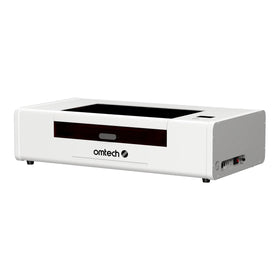
Desktop laser engravers are smaller and highly portable. A smaller desktop laser engraver like the OMTech K40+ only measures 31.9 x 19.7 x 9.8 in. (810x500x250 mm), which means you can easily fit it through your door and down your basement stairs to install it wherever it fits best.
Floor-standing laser engravers, on the other hand, are much bulkier, which means you pretty much have to have a dedicated space for them. Even then, getting them through the doorway, down the stairs, and into your basement may be a problem.
2. Z-Axis Depth
One big constraint with desktop laser engravers is that they usually do not have enough space for you to fit comfortably to engrave larger or taller items like Stanley cups or larger pieces of wood.
Floor-standing laser engravers, because they are naturally bigger, come with sufficient space for you to engrave most (if not all) of the larger or taller items you may want to engrave.
The OMTech Pronto 35, for example, which is the smallest and most affordable in OMTech's line of Pronto Laser Engravers, comes with an 8.7 in. Workpiece Height to accommodate taller items: an impressive 83% increase from the earlier desktop models.
3. Power Capacity
Perhaps the most obvious difference between desktop and CO2 laser engravers is the amount of laser power you get with each type. Desktop laser engravers are often limited to 40-55W laser tubes, and only the advanced models like the OMTech Polar 2 accommodate 70W tubes.
Floor-standing laser engravers, on the other hand, are almost unlimited in capacity. Most models range between 70-100 watts, but there are also advanced cabinet/floor-standing machines like the OMTech Pro Flying CO2 laser engravers, with models that reach 150 W
3. Integrated Chilling
All CO2 laser engravers need constant chilling, and depending on whether you get a desktop or floor-standing laser engraver, you may need to spend extra on a water chiller. Most desktop laser engravers, especially the earlier models, do not have internal water chillers, and even when they do, these are usually small models that do not have the capacity you may need for laser cutting tasks of different sizes.
So, if you get a desktop laser engraver, you may need to budget additionally for a water chiller, and think of where to place it.
Decent floor-standing laser engravers come with water chillers, or at least enough space for you to place a large industrial water chiller. Even the Maker AF2028-60, which is the most affordable model in OMTech’s line of Maker CO2 Laser Engravers, provides enough room for you to attach a 6 L industrial water chiller, which you can buy with the machine.
Desktop vs. Floor-Standing CO2 Laser Engravers: Key Differences Summarized
|
Feature |
Desktop Enclosed Lasers |
Floor-Standing / Industrial Lasers |
|
Workspace Access |
Highly portable; can be maneuvered through tight doorways and basement stairs. |
Bulky and heavy; often requires a double door or garage entry to install. |
|
Z-Axis Depth |
Shallow clearance; limited room for large cylindrical objects or tall items. |
Deep cabinet depth; plenty of room for heavy-duty rotary chucks and large tumblers. |
|
Power Capacity |
Usually tops out around 50W–70W CO2 to maintain a compact footprint. |
Easily accommodates longer, higher-wattage 90W–130W+ CO2 laser tubes. |
|
Integrated Chilling |
Internal chillers are rare or small, often requiring external components for heavy use. |
Larger cabinets frequently house or have space underneath for robust water chillers. |
In summary, the main advantage of desktop laser engravers over cabinet, floor-standing models is that they are portable and more affordable, and great for beginners. However, they are also limited in power (50-70W) and require a lot of external laser engraver accessories for smooth use and operation.
Cabinet, floor-standing laser engraving machines, on the other hand, are great in that they are more powerful (up to 150W+), have larger work areas and plenty of room for larger materials and items, and they are great for commercial applications.
However, they are more expensive and very difficult to move around or install in small home spaces.
Key Tips For Choosing Between Desktop and Floor-Standing/Industrial Laser Engravers
There are several non-obvious practicalities when it comes to buying and operating a desktop laser engraver vs. a floor-standing laser engraver. Here are some of the major ones:
1. Consider The "Basement Nightmare" Constraint
Traditional 90W to 100W cabinet laser engravers are usually very bulky: they tend to have a minimum dimension that rarely clears tight residential stairwells or standard door frames. This introduces a logistical challenge when you are trying to bring the laser engraver into your home or move it from place to place.
2. Take Account of The Rotary Depth Trap
One of the major complaints among desktop laser owners is that most models lack physical vertical space (Z-depth). So, if you plan to engrave wide objects, large tumblers, or use a chunky roller/chuck rotary axis, you may need to buy an additional riser base or remove the bottom floor entirely to make them fit. Floor-standing machines give you the depth out of the box.
3. Component Quality vs. Gimmicks
Another major difference is how easy it is to find spare or adjustment parts for the machines. Full-sized industrial machines are bare-bones, but they use standard, easily replaceable industrial components.
High-end desktop laser engravers, on the other hand, often have proprietary tech (like integrated app ecosystems or built-in internal cameras) that look great on a spec sheet but can limit third-party repairability.
Should You Choose a Desktop or Freestanding Laser Engraver?
Choose a desktop laser if:
-
You are operating out of a home spare room, apartment, or a basement with narrow, winding stairs.
-
Your primary products are flat or relatively thin items, like custom wedding table numbers or thin wooden signs.
-
You need a plug-and-play Class 1 enclosed safety setup that fits safely alongside other desktop craft equipment.
Choose a floor-standing laser if:
-
You have direct garage or double-door shop access and don't have to worry about standard doorway restrictions.
-
You plan to run a high-volume batch production business requiring a massive work bed and heavy-duty 90W–100W+ processing speeds.
-
You want to engrave large, oddly shaped pieces or tall cylindrical items using high-clearance rotary tools without modifying your machine's chassis.
Final Thoughts on Buying a Desktop or Floor-Standing Laser Engraver
In summary, choosing between a desktop and a floor-standing laser engraver ultimately comes down to your workspace, production requirements, and the types of projects you intend to handle. If neither option seems like the perfect fit, consider a mid-tier machine that combines some of the advantages of both configurations.
Ultimately, don't choose a laser engraver based on wattage alone. Consider where you will install it, the physical dimensions of your workpieces, the accessories you need, and how much production capacity you expect to require in the future.