






OMTech User Story Phoenix ProTech
OMTech User Story: How Phoenix ProTech Uses Two OMTech Lasers For Three Trades
Meet Gregory Tiegs, Owner and Manager of Phoenix ProTech
Gregory Tiegs does not fit into one job title, and neither does his company. Mr Tiegs runs Phoenix ProTech Data Solutions LLC, a veteran- and family-owned business in the Phoenix, Arizona metro area, which works in three sectors:
- small business networking and IT solutions,
- metal repair and fabrication,
- and laser engraving and cutting on a wide range of materials.

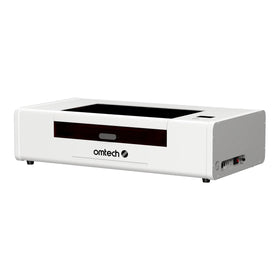
Laser work is one of those three pillars, and this is a story of how two OMTech machines, a Maker 60W CO2 and a Pronto 35 100W, have expanded what the business can offer and are helping him serve customers spread all across the United States.
His experience offers useful lessons for anyone considering a first laser engraver or looking to upgrade an existing machine, particularly when the goal is to turn laser work into a reliable part of a business.
From Simple Beginnings, The OMTech Maker 60W Provides a Big Step Up
Gregory's OMTech story starts a few years ago, when he bought an OMTech Maker 60W second-hand from an online listing. The interesting thing is, Mr Tiegs already had a laser in the shop, but he quickly saw many ways in which the Maker would be a worthy upgrade. As he himself puts it, the Maker 60W was going to be "great for learning and a major improvement from my prior laser."
The upgrade paid off in the shop, too. With the Maker, he was able to expand his product line and work more efficiently, two things any small business owner wants from a new piece of equipment.
For prospective buyers, this is a very important point: upgrading a laser engraver is not necessarily about replacing an old machine that no longer works. It can be about removing limitations that prevent a business from taking on new projects, producing more consistently, or working more efficiently. Even a pre-owned laser engraver can represent a meaningful step forward when the machine better matches the work you want to do.
Business Grows, and Mr Tiegs Doubles Up with the Pronto 100W
After gaining experience with the Maker 60W, Gregory made another investment a few months ago, adding an OMTech Pronto 35 100W CO₂ laser to his workshop.
Once again, the upgrade brought two benefits he valued: a wider range of products he could offer and improved production efficiency. But this time, he had a clearer understanding of what mattered most when choosing a machine.
"The biggest thing I have learned is that power and speed are critical in efficiency," he says.
Again, another important lesson if you own or run a laser engraving business: it goes beyond simply finishing a job faster. Machine power and engraving speed can influence how much work a shop can complete, how it handles demanding projects, and how effectively it meets customer deadlines.
When a laser is part of a business's production process, those factors can have a direct impact on its ability to take on more orders.
Gregory's move from the Maker 60W to the Pronto 35 100W also shows why it is very important to consider longer-term needs rather than choosing a machine based only on the projects they can handle today. A machine that provides room to expand can help reduce the need for another upgrade as business requirements change.

Mr Tiegs’ Unique Dual Pronto and Maker Setup
Gregory now runs the OMTech Pronto 35 100w and the Maker OMTech Maker 60W side by side, and he sees that setup as a business decision, not a luxury.
In his words, "Having two devices is important for redundancy when using them for your business."
The reasoning is straightforward: when customers depend on your ability to complete orders, equipment downtime can become a business problem. A second machine provides another option if one needs maintenance or temporarily becomes unavailable. It also gives the business more flexibility in how it manages its workload.
So far, neither machine has given him trouble beyond regular maintenance. His background as an electrical technician, along with years in network and data infrastructure, means he can easily follow how the internal components of the machines work.
His technical background is an advantage, but his broader lesson applies to any laser business: understanding routine maintenance and planning for unexpected downtime are important parts of running a dependable operation.

How Mr Tiegs Builds the Right Environment For Laser Work at The Phoenix ProTech Workshop
Mr Tieg’s two lasers operate in a workshop of approximately 700 square feet at his home. The space is climate-controlled, ventilated, and equipped with air filtration to help manage dust and maintain a suitable working environment.
The Maker and Pronto sit alongside each other, with both machines vented to the outside of the building. The Maker is also equipped with a rotary attachment, while a nearby spray booth for painting and sanding has its own outdoor ventilation.
The rest of the workshop gives a better picture of how laser engraving fits into Gregory's wider business. There is a 10KW industrial Lincoln welder, table saws, a router table, sanders, a planer, a jointer, and other equipment for metalworking and woodworking. Customers and clients regularly visit the space, where different services and fabrication capabilities come together.
If you are looking to buy a laser engraving machine, Gregory's workshop offers a useful reminder: choosing the machine is only one part of setting up a productive workspace. Ventilation, filtration, available floor space, electrical requirements, and the accessories needed for particular projects all deserve attention before installation.

Paying it forward and Helping the OMTech Community
Gregory has applied to become a host in OMTech's Demo Room Host Program, and his reasons are personal as much as professional. "I enjoy sharing my knowledge and experience with others to help them grow," he says. A demo room, as he sees it, lets people in his community see first-hand what they are buying and decide whether the investment is right for them.
He knows the value of that from the other side. "I did not know the demo room program was a thing before buying either of my OMTech machines, but wish I did," he says. Had he seen the machines in person first, he likely would have bought a larger, more powerful machine from the start, and he would have known right away which accessories were critical and which were not.
He has also been the go-to person for laser troubleshooting.
A friend with a laser engraver has run into problems ranging from laser alignment to safety switch malfunctions, and Gregory has guided him through the troubleshooting each time, getting the machine back online.
If he is approved as a host, visitors will get the same welcome his customers do: a friendly introduction, a question about what they hope to learn, and a demo tailored to their answers.

5 Lessons From Phoenix ProTec on How to Buy and Use a Commercial Laser Engraver
Gregory's experience with the Maker 60W and Pronto 35 100W offers several practical lessons for anyone considering a laser engraver for business use.
- Consider power and speed in relation to your workload. A machine's capabilities affect how efficiently you can complete jobs and what types of projects you can take on. Think beyond your current needs and consider where you want your business to go.
- Think about production continuity. If customers rely on your output, downtime can affect deadlines and revenue. Gregory values having a second machine as a backup, although the right setup will depend on your order volume and budget.
- See a machine in action before buying, if possible. Specifications are useful, but a live demonstration can help you understand the workflow, accessories, and practical capabilities you will need.
- Plan your workspace before installation. Ventilation, filtration, available space, and equipment placement all contribute to a suitable working environment. These are costs and requirements worth considering alongside the machine itself.
- Look at how laser work fits into your wider business. Gregory combines engraving with IT services and metal fabrication. A laser doesn't have to be your entire business; it can also help you expand your existing services and reach new customers.
Find the right laser for your business
Whether you start where Gregory did, with a Maker 60W, or you are ready for the extra power of a Pronto 100W, OMTech has options to match. Explore all the OMTech Maker CO2 Laser Engravers (60W to 150W) and Pronto CO2 Laser Engravers (60W-150W). You can also visit an OMTech Demo Room close to you to learn more about seeing OMTech machines in action.