







How To Choose Between 60W, 90W and 100W CO2 Laser Engravers
- A 60W CO2 laser is an excellent choice for a business that is focused on detailed engraving and just light-to-medium cutting.
- A 90W CO2 laser offers a better balance of cutting power and engraving versatility. Consider it if your business needs a balance of detailed engraving and heavy cutting.
- A 100W CO2 laser is designed for businesses that regularly process thicker materials and need greater production capacity.
If you are currently deciding between a 60W, 90W, and 100W CO2 laser engraver, the deciding factors should be what you plan to make, how frequently you expect to use your machine, and how much production capacity your business needs.
Here is a short answer before we go deeper:
Remember, if buying a laser engraver was as simple as finding the machine with the most power, everybody would be going for a 150W CO2 laser, and few people would ever be able to afford it.
Your goal should be to choose a machine that comfortably handles your most common jobs without sacrificing the engraving quality, production efficiency, or operating costs that matter to your business.
In this guide:
- What extra wattage actually gets you
- What a 60W, 90W, and 100W CO2 laser can do, and who should choose each
- Which wattage suits which material and thickness
- Five factors that decide it for your business
- A decision matrix and six buying tips
60W vs. 90W vs. 100W at a Glance
The three wattages overlap on thin materials and separate on thick ones. Use this table for a quick read, then see the sections below for the reasoning.
| Spec | 60W | 90W | 100W |
|---|---|---|---|
| Best for | Detailed engraving, personalization, light-to-medium cutting | Mixed engraving and heavier cutting | Thick-material cutting and high-volume production |
| Wood (plywood/MDF) cutting | 3- 6 mm in a single pass | Up to about 12mm | About 12- 19 mm |
| Acrylic cutting | About 6- 10 mm | 6mm comfortably, up to about 12mm | About 15- 20 mm |
| Fine-detail engraving | Best of the three (lowest minimum firing threshold) | Good, needs careful power adjustment on delicate materials | Hardest (highest minimum firing threshold) |
| Example machine | OMTech Pronto 35 | OMTech Pronto 40 | OMTech Pronto 45 |
| Challenges You Might Face | Slow on thick material; 10mm plywood needs multiple passes | Delicate photo engraving on thin materials takes more careful tuning | Needs a stronger chiller, ventilation, and possibly a 220V supply |
Take Note: These are general ranges, not guaranteed cutting specs. Results depend on material, density, focus, air assist, optics, and machine condition.

What Can a 60W CO2 Laser Do, and Who Should Choose It?
Laser Engraving Performance
Detailed engraving is where a 60W CO2 laser shines the most. In fact, the unique advantage of a 60W CO2 machine is that it has a lower minimum firing threshold, which means it can engrave on delicate surfaces without scorching them, particularly when engraving photographs, fine text, and intricate designs.
Laser Cutting Performance
For laser cutting, a 60W machine handles materials such as 3mm to 6mm plywood, MDF, and hardwoods at reasonable speeds. It can also cut cast and extruded acrylic. With many of OMTech’s 60W CO2 laser engravers, I have found that 6mm to 10mm is a practical range depending on the material and machine configuration.
5 Best uses of a 60W CO2 Laser Engraver
- Engraving or cutting thin to medium wood. A 60W CO2 laser slices cleanly through 3mm to 6mm (approx. 1/8" to 1/4") plywood, Baltic birch, MDF, and hardwoods (like walnut) in a single pass at moderate speeds. I make robot baseplates, boxes, token trays, and small wood crafts from this 1/8 Baltic Birch plywood, and it is smooth with the OMTech Maker MF1624-60 60W CO2 Laser.
- Acrylic fabrication. I also find that 60W CO2 lasers perform exceptionally when it comes to cutting and etching cast or extruded acrylic sheets up to about 6mm to 10mm thick. It yields smooth, flame-polished, burr-free edges.
- Detailed vector and raster engraving: For detailed projects on a commercial scale, a 60W CO2 is perfect. Great for marking logos, text, and artwork onto wood, leather, cork, glass, coated metals (anodized or powder-coated), and rubber stamps.
- Soft materials and textiles: Most textile entrepreneurs who purchase OMTech laser engravers tend to choose 60W CO2 models. That is because they deliver fast and clean processing for cutting/engraving leather, cardstock, corrugated cardboard, foam (for model/airplane wings), and fabric.
- Tumblers and cylindrical items: When paired with a rotary attachment, a 60W CO2 laser is excellent for handling personalizing drinkware and cylindrical wood or coated pieces. I pair most OMTech models with this 4-wheel rotary axis, and it has just the right balance of laser power and workspace.
What Are the Limitations of a 60W CO2 Laser? Where it Might Let You Down
The main limitation of a 60W CO2 laser is production speed when working with thicker materials. For example, cutting 10mm plywood or dense hardwood is usually a problem because it requires multiple passes and progress is really slow.
If your business depends on processing thick sheets throughout the day, it is better to step up to a 90W or 100W machine.
Who Should Choose a 60W CO2 Laser?
A 60W laser is particularly suitable for smaller businesses that generate revenue from customization and detailed engraving rather than high-volume cutting. If the amount of detailed engraving work outweighs the amount of heavy laser cutting work that comes in (say from a ratio of 70: 30 and above), then it is safe to go for a 60W CO2 laser.
A 60W CO2 laser engraver is the best and most versatile option if you own or run a small business that prioritizes engraving quality, personalized products, and only cuts relatively thin materials.
Bottom Line
A 60W CO2 laser is the best and most versatile option if you own or run a small business that prioritizes engraving quality and personalized products, and only cuts relatively thin materials
An Ideal CO2 Laser To Consider
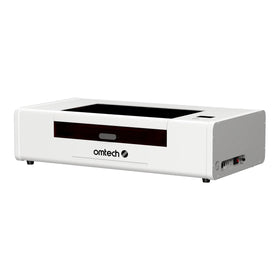
The OMTech Pronto 35 60W Laser Engraver is a good example of a business-oriented 60W machine. It offers a 27.6" × 19.7" working area, autofocus, and a maximum engraving speed of 1,000 mm/s.
It is also compatible with LightBurn and supports long-material processing through its pass-through design. With an estimated tube service life of up to 12,000 hours under specified operating conditions, it offers a practical combination of engraving flexibility and production capacity.
For a small business focused on customized products, detailed engraving, and light-to-medium cutting, the Pronto 35 is worth considering.
What Can a 90W CO2 Laser Do, and Who Should Choose It?
A 90W CO2 laser engraver is the sweet spot if your business gets a lot of heavy laser cutting work (as opposed to detailed engraving), but you don't have the budget or space to move into a much larger industrial setup. They provide faster throughput and deeper cutting power than 40W–60W hobby machines without jumping to industrial 130W+ systems.
Laser Cutting Performance
Compared with a 60W machine, it offers faster vector cutting, greater cutting depth, and more flexibility when working with thicker materials. It can comfortably handle 6mm plywood and acrylic, with suitable configurations capable of cutting materials approaching 12mm in a single pass.
Laser Engraving Performance
A 90W machine also retains enough versatility for general engraving. You can work with wood, leather, glass, fabric, rubber, and coated materials, although delicate photo engraving on thin materials requires more careful power adjustment.
One important consideration is the minimum firing threshold. Higher-wattage glass CO2 tubes generally require more minimum power to fire than lower-wattage tubes. This can make delicate grayscale engraving more difficult, particularly on paper, thin veneer, and light-colored leather.
However, the additional cutting capacity offers an important advantage: you can often complete the same job at a lower percentage of the machine's available power.
5 Key Applications Where a 90W CO2 Laser Engraver Excels
- Laser cutting thick materials. 90W is ideal for single-pass cutting through non-metallic sheets like 1/4-inch to 1/2-inch (12mm) plywood, MDF, and acrylic.
- Treated metal marking: While a 90W laser engraver cannot cut raw sheet metal, it tends to do very well when it comes to permanently marking anodized aluminum, powder-coated tumblers (like Yeti or Stanley), or stainless steel treated with a marking spray.
- High-speed vector and raster engraving: Handles batch production and personalized items at speeds often ranging from 600 mm/s up to 1,000 mm/s.
- Wide range of non-metals: Works effectively on wood, acrylic, leather, glass, fabric, rubber, stone, and paper.
Who Needs a 90W CO2 Laser Engraver?
Again, a 90W laser engraver is perfect for a small- to mid-size business that is receiving a lot of laser cutting work on thicker materials and is looking to expand its laser cutting capabilities.
In fact, it is time to consider a 90W CO2 laser if:
- laser cutting thick materials constitutes 70% of your business,
- you need faster engraving capabilities than a 60W CO2 laser can provide.
- You are facing growing production, but don't have the budget for a 100W+ laser.
The majority of OMTech customers who choose 90W CO2 lasers are growing Etsy businesses producing personalized products in batches, custom signage companies cutting thicker acrylic and plywood, small furniture and interior decoration businesses producing wooden components and decorative panels, and commercial engraving shops handling a mixture of cutting, engraving, and personalization orders.
Bottom line: 90W
A 90W CO2 laser suits a small to mid-size business with a lot of thick-material cutting that wants more cutting capability without moving to a much larger industrial setup.
What Makes The OMTech Pronto 40 a Bestselling 90W CO2 Laser Engraver?
The OMTech Pronto 40 offers a 90W laser tube, a 35.4" × 23.6" working area, and a maximum engraving speed of 1,000 mm/s.
- Its front and rear pass-through openings accommodate materials up to approximately 39.3" long, giving businesses additional flexibility when producing longer signs and components.
- The machine also features autofocus, LightBurn compatibility, and USB and Ethernet connectivity.
For a growing business that needs to combine detailed engraving with faster cutting and larger production batches, the Pronto 40 offers a useful balance of capacity and versatility.

What Can a 100W CO2 Laser Do, and Who Should Choose It?
A 100W laser is built for businesses that regularly work with thicker materials and need to finish cutting jobs efficiently. Its biggest advantage over 60W and 90W is cutting capacity: depending on material and configuration, expect roughly 12- 19 mm plywood and MDF and acrylic up to about 15- 20 mm.
The trade-offs
- Engraving: A 100W glass tube generally has a higher minimum firing threshold, which makes delicate engraving and low-power grayscale work harder.
- Support equipment: You may need an appropriate industrial water chiller, effective ventilation, and a suitable electrical supply.
Key applications where 100W excels
- Thick-material cutting. 1/2" to 3/4" plywood and MDF, thick acrylic (about 15-20mm), leather, rubber, and fabric in fewer passes, often one, compared with 40-60W machines.
- Handling commercial and production workloads. Sign-making, architectural models, custom boxes and bulk product runs where speed and cutting power matter.
- Coated and treated metal marking. It cannot cut raw sheet metal (that needs a fiber laser), but it can etch anodized aluminum, powder-coated tumblers, and bare steel pre-treated with a marking spray such as LaserBond.
Businesses that need a 100W laser
- Commercial sign makers producing large acrylic signs and displays
- Small manufacturing workshops making wooden components and custom enclosures
- Architectural model makers working with thicker materials
- Established personalization businesses handling larger batches
- Custom furniture and decorative product manufacturers
Consider The OMTech Pronto 45 (100W)
The OMTech Pronto 45 has a 100W tube, a 39.4" x 23.6" working area, and a maximum engraving speed of 1,000 mm/s. Front and rear pass-through openings take material up to about 45.3" long. It also offers autofocus, LightBurn compatibility, and USB and Ethernet connectivity. For commercial signage businesses, custom manufacturers, and workshops that regularly process thicker materials, it provides the capacity for more demanding projects.
Five Factors to Consider When Choosing Between 60W, 90W, and 100W
Understanding the differences in wattage is a good starting point. However, five other considerations can help you determine which machine makes the most sense for your business.
1. Your Balance Between Engraving Detail and Cutting Speed
First, consider whether your business generates more revenue from engraving or cutting.
- If most of your orders involve detailed photographs, logos, intricate patterns, and personalized products, a 60W machine offers an advantage through its lower minimum firing threshold.
- If you regularly alternate between engraving and cutting, a 90W machine provides a useful middle ground. You get additional cutting capacity without moving as far into the higher minimum-power requirements of a 100W tube.
- If your main business involves cutting thick materials, producing large components, or processing repeated orders, a 100W machine is the better choice.
2. The Materials and Thicknesses You Work With
Your primary materials should influence your decision more than the wattage itself.
| Material | Recommended Power | Notes |
|---|---|---|
| Thin plywood (3mm) |
60W or 90W |
Both offer sufficient cutting capacity. |
|
Plywood (6mm) |
60W or 90W |
A 60W handles it at moderate speeds; 90W offers greater throughput. |
|
Thick plywood/MDF (10–12mm) |
90W or 100W |
More power helps achieve faster, cleaner single-pass cuts. |
|
Very thick wood (15mm+) |
100W |
Greater cutting capacity makes demanding jobs more practical. |
|
Cast acrylic (6mm)
|
60W or 90W
|
Both can handle this thickness effectively. |
|
Thick acrylic (10–15mm+) |
90W or 100W |
Higher wattage provides greater cutting capacity. |
|
Leather, paper, and cardstock |
60W |
Lower minimum firing power helps prevent scorching. |
|
Glass, slate, and coated metals |
60W or 90W |
These applications generally involve surface engraving rather than cutting. |
3. Your Daily Production Volume
How many hours do you expect to operate your laser, and how many orders do you need to complete each day?
- A small engraving studio producing customized gifts may not benefit significantly from moving from 60W to 100W if most jobs involve thin materials.
- However, a growing business producing dozens of acrylic signs or wooden components every day will benefit from the additional cutting capacity of a 90W or 100W machine.
There is also a tube-longevity consideration. Running a smaller tube close to its maximum output for extended periods can accelerate wear. A higher-wattage machine gives you more headroom to complete demanding jobs without constantly pushing the tube to its limits. For businesses with regular production workloads, a 90W or 100W machine can therefore be a more practical long-term investment.
4. Your Budget and Supporting Equipment
The purchase price is only part of the investment. You also need to consider cooling, ventilation, electrical requirements, replacement tubes, and other maintenance expenses.
- A 60W machine generally has lower supporting-equipment requirements, although an appropriate water-cooling system and exhaust setup are still essential.
- A 90W machine requires more substantial cooling, particularly if you intend to operate it for several hours daily. An active industrial chiller is preferable to a basic bucket-style cooling arrangement.
- A 100W machine requires even more attention to cooling and ventilation. Depending on its configuration, you may also need a dedicated 220V electrical connection.
Before purchasing, check whether the machine includes a suitable cooling system or whether you need to budget for one separately.
5. Your Available Workspace and Future Business Plans
Finally, consider the physical size of the machine and how much room you have available.
A higher-wattage machine is not necessarily better if you cannot accommodate its work area, cooling equipment, ventilation, and material storage.
However, it is also worth thinking about where your business will be in two or three years. If you expect to expand into thicker acrylic signage, larger wooden products, or more demanding commercial orders, investing in a 90W or 100W machine now could prevent an expensive upgrade later.
What Is the Advantage of More Wattage in a CO2 Laser Engraver?
Before comparing individual machines, it always helps to understand what the additional wattage actually gives you. There are two main advantages of having a higher-power CO2 laser:
- You get greater cutting capacity
- Faster processing of thicker materials.
However, more wattage does not automatically translate into better fine-detail engraving. This is an advantage that a lower-power CO2 laser engraver, like a 55-60W desktop CO2 engraver, will give you.
Which CO2 Laser Power Is Right for Your Business?
The difference between a 60W, 90W, and 100W CO2 laser engraver comes down to the type of work you want to produce and the production capacity your business requires.
Ultimately, the best machine is not necessarily the one with the highest wattage. It is the one that can handle your most common jobs efficiently while giving your business enough flexibility to grow.
If you are still deciding, start by examining the materials you work with, the thicknesses you need to cut, and the number of orders you expect to process each day. Those three considerations will bring you much closer to choosing the right CO2 laser for your business.